面向切面的Spring——AOP

什么是面向切面编程

切面能够帮助我们模块化横切关注点,横切关注点可以被描述为影响应用多处的功能,下图直观的呈现了横切关注点的概念。
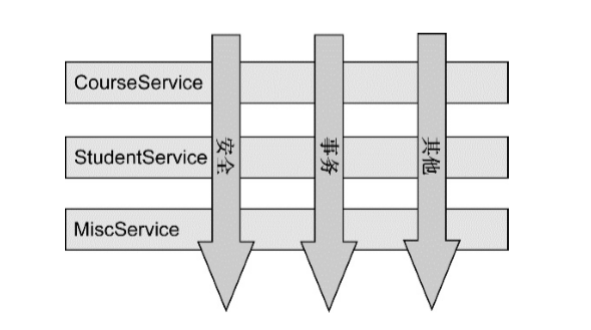
每个模块的核心功能都是为特定业务领域提供服务,但是如果要做到通用功能的话,最常见的面向对象技术十集成或委托,但是如果在整个应用程序中都使用相同的基类,继承往往会导致一个脆弱的对象体系;而使用委托可能需要对象进行复杂的调用。

切面提供了另一种可选方案,而且在很多场景下更清晰简洁。在使用面向切面编程时,我们仍然在一个地方定义通用功能,但是可以通过声明的方式定义这个功能要以何种方式在何处应用,而无需修改受影响的类。横切关注点可以被模块化为特殊的类,这些类被称为切面(aspect)这样做的好处就是每个关注点都集中于一个地方,而不是分散到多处代码中,其次服务模块更加简洁,只需要关注核心代码就行了。

定义AOP术语

  • 通知(Advice):通知定义了切面是什么以及何时使用。除了描述切面要完成的工作,通知还解决了何时执行这个工作的问题。因此可以说,切面的工作被称为通知。Spring切面可以应用5种类型的通知:
    • 前置通知(Before):在目标方法被调用之前调用通知功能。
    • 后置通知(After):在目标方法完成之后调用通知,此时不会关心方法的输出。
    • 返回通知(After-returning):在目标方法成功执行之后调用通知。
    • 异常通知(After-throwing):在目标方阿飞抛出异常后调用通知。
    • 环绕通知(Around):通知包裹了被通知的方法,在被通知的方法调用之前和调用之后执行自定义的行为。
  • 连接点(Join point):我们的应用可能有数以千计的时机应用通知,这些时机被称为连接点,连接点是在应用程序中能够插入切面的一个点。
  • 切点(Pointcut):如果说通知定义了切面的“什么”和“何时”的话,那么切点就定义了“何处”,切点的定义会匹配通知所要织入的一个或多个连接点。
  • 切面(Aspect):切面是通知和切点的结合。通知和切点共同定义了切面的全部内容:它是什么,在何时和何处完成其功能。
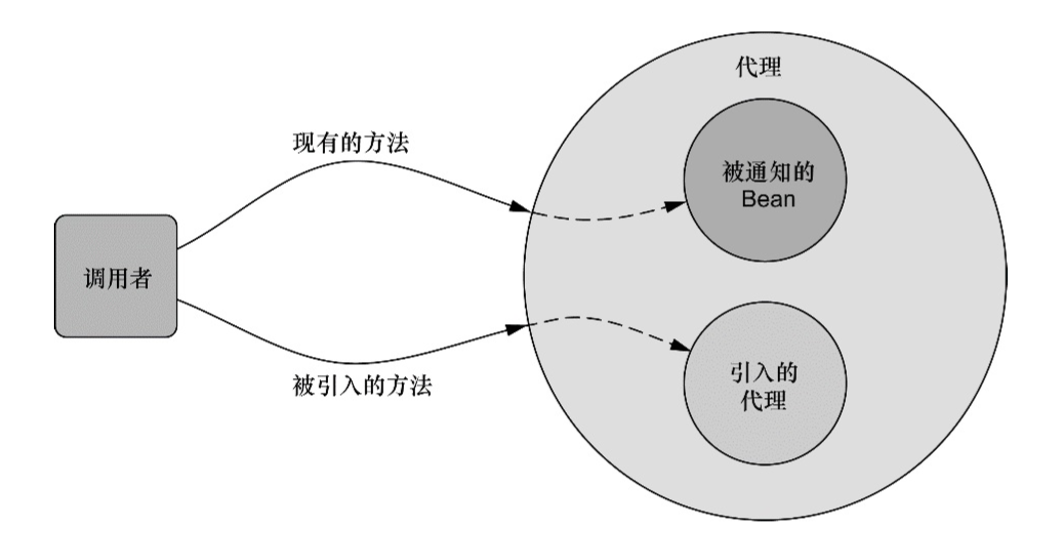
  • 引入(Introduction):引入允许我们向现有的类添加新方法或属性。
  • 织入(Weaving):织入是把切面应用到目标对象并创建新的代理对象的过程。切面在指定的连接点被织入到目标对象中。在目标对象的生命周期里有多个点可以进行织入:
    • 编译器:切面在目标类编译时被织入,AspectJ的织入编译器就是以这种方式织入切面的。
    • 类加载期:切面在目标类加载到JVM时被织入。
    • 运行期:切面在应用运行的某个时刻被织入。Spring AOP就是以这种方式织入切面的。

通过切点来选择连接点

切点用于准确定位应该在什么地方应用切面的通知。通知和切点时切面的最基本元素。在Spring AOP中,要使用AspectJ的切点表达式语言来定义切点。下面是Spring AOP所支持的AspectJ切点指示器:
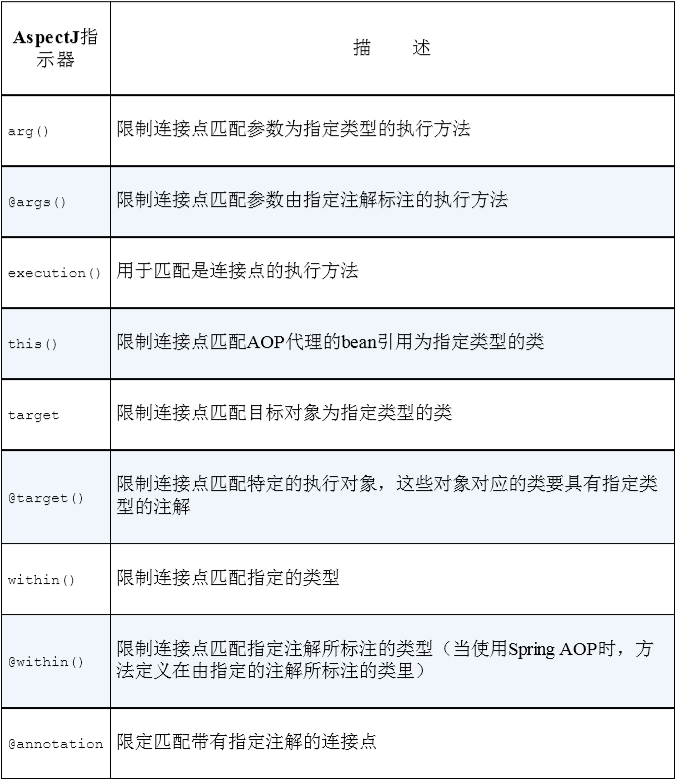
在Spring中尝试使用AspectJ其它指示器时,将会抛出IllegalArgumentException异常。

编写切点

为阐述Spring中的切面,我们需要有个主题来定义切面的切点,为此我们定义一个Performance接口:

1
2
3
4
package concert;
public interface Performance {
public void perform();
}

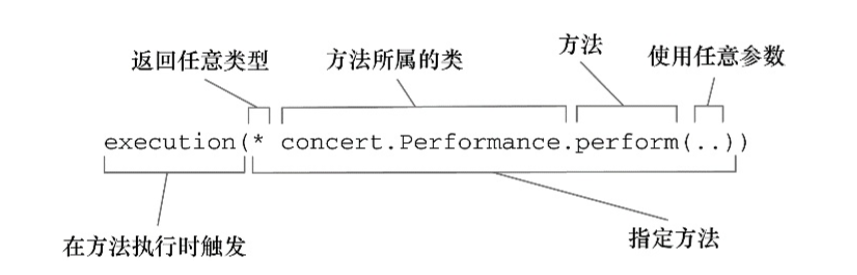
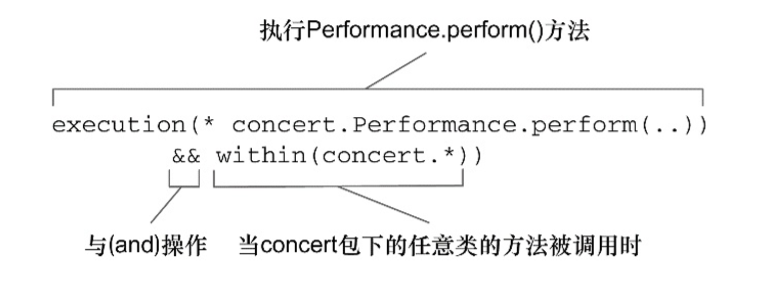
Performance可以代表任何类型的现场表演,假设我们想编写Performance的perform()方法触发的通知,下面展示了一个切点表达式,这个表达式能够设置当perform()方法执行时触发通知的调用:我们使用execution()指示器选择Preformance的perform()方法。方法表达式以“*”号开始,表明我们不关心方法返回值的类型。然后我们指定了全限定类名和方法名。对于方法参数列表,我们使用两个点号(..)表明切点要选择任意的perform()方法,无论该方法的入参是什么。假设我们需要配置的切点仅匹配concert包,可以使用within()指示器来限制匹配。使用“&&”来表示与的关系,“||”和“!”也同理:
在切点中选择bean

Spring引入一个新的bean()指示器,允许我们在切点表达式中使用bean的ID来标识bean。bean()使用bean ID或bean名称作为参数来限制切点只匹配特定的bean:在这里我们希望在执行Performance的perform()方法时应用通知,但限定bean的ID为woodstock。


在此场景下,切面的通知会被编织到所有ID不为woodstock的bean中。

使用注解创建切面

我们已经定义了Performance接口,他们是切面中切点的目标对象,现在使用AspectJ注解来定义切面。

定义切面

从演出的角度来看,观众是非常重要的,因此,将观众定义为一个切面,并将其应用到演出上:

1
2
3
4
5
6
7
8
9
10
11
12
13
14
15
16
17
18
19
20
21
22
23
24
25
26
27
28
29
package concert;
import org.aspectj.lang.annotation.AfterReturning;
import org.aspectj.lang.annotation.AfterThrowing;
import org.aspectj.lang.annotation.Aspect;
import org.aspectj.lang.annotation.Before;

@Aspect
public class Audience {
@Before("execution(* concert.Performance.perform(..))") // 表演之前
public void silenceCellPhones()
{
System.out.println("Silencing cell phones");
}
@Before("execution(* concert.Performance.perform(..))") // 表演之前
public void takeSeats()
{
System.out.println("Taking seats");
}
@AfterReturning("execution(* concert.Performance.perform(..))") // 表演之后
public void applause()
{
System.out.println("CLAP CLAP CLAP!!!");
}
@AfterThrowing("execution(* concert.Performance.perform(..))") // 表演失败之后
public void demandRefound()
{
System.out.println("Demanding a refund");
}
}

Audience类使用@Aspect注解标注,该注解表明Audience不仅仅是一个POJO,还是一个切面。

Audience四个方法定义了一个观众在观看演出时可能会做的事情:手机调至静音、就坐、喝彩鼓掌以及退款。可以看到这些方法都使用通知注解来表明它们应该在什么时候调用,注解都有如下:
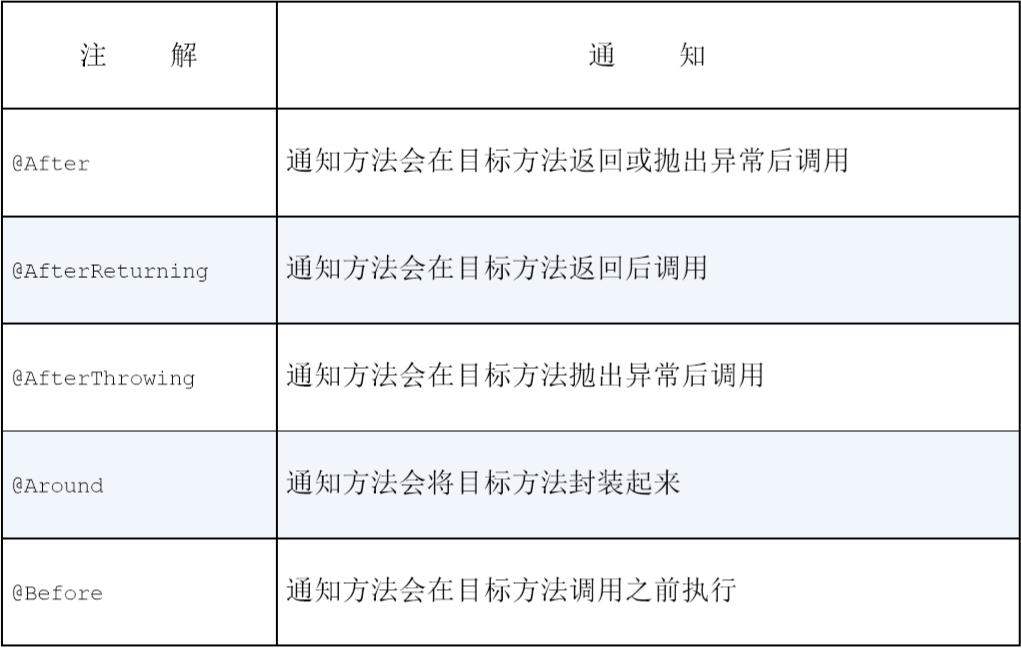
你可能注意到所有的这些注解都给定了一个切点表达式作为它的值,同时这四个方法的切点表达式都是相同的。所以我们可以改进一下,如果我们只定义这个切点一次,然后每次需要的时候引用它,那么这会是一个很好的方案。@Poincut注解能够在一个@AspectJ切面内定义可重用的切点

1
2
3
4
5
6
7
8
9
10
11
12
13
14
15
16
17
18
19
20
21
22
23
24
25
26
27
28
29
30
31
32
33
package concert;
import org.aspectj.lang.annotation.AfterReturning;
import org.aspectj.lang.annotation.AfterThrowing;
import org.aspectj.lang.annotation.Aspect;
import org.aspectj.lang.annotation.Before;
import org.aspectj.lang.annotation.Pointcut;

@Aspect
public class Audience {
@Pointcut("execution(* concert.Performance.perform(..))") //定义命名的切点
public void performance(){}

@Before("performance()")
public void silenceCellPhones()
{
System.out.println("Silencing cell phones");
}
@Before("performance()") // 表演之前
public void takeSeats()
{
System.out.println("Taking seats");
}
@AfterReturning("performance()") // 表演之后
public void applause()
{
System.out.println("CLAP CLAP CLAP!!!");
}
@AfterThrowing("performance()") // 表演失败之后
public void demandRefound()
{
System.out.println("Demanding a refund");
}
}

需要注意的是,除了注解和没有操作的performance()方法,Audience类依然是一个独立的POJO,只不过它通过注解表明会作为切面使用,像其他类一样,它可以装配为Spring中的bean:

1
2
3
4
@Bean 
public Audience audience() {
return new Audience();
}

但是到此为止的话,@Audience只会是Spring容器中的一个bean,并不会被视为切面,需要将这些注解启用配置到配置文件中:

1
2
3
4
5
6
7
8
9
10
11
12
13
14
15
16
17
18
19
package concert;
import org.springframework.context.annotation.Bean;
import org.springframework.context.annotation.ComponentScan;
import org.springframework.context.annotation.Configuration;
import org.springframework.context.annotation.EnableAspectJAutoProxy;

// 启动AspectJ自动代理
@Configuration
@EnableAspectJAutoProxy
@ComponentScan

public class ConcertConfig
{
@Bean
public Audience audience()
{
return new Audience();
}
}

当然使用XML文件配置也是完全可以的:

1
2
3
4
5
6
7
8
9
10
11
12
13
14
15
16
/ 在XML中,通过Spring的aop命名空间启用AspectJ自动代理
<?xml version="1.0" encoding="UTF-8"?>
<beans xmlns="http://www.springframework.org/schema/beans"
xmlns:xsi="http://www.w3.org/2001/XMLSchema-instance"
xmlns:context="http://www.springframework.org/schema/context"
xmlns:aop="http://www.springframework.org/schema/aop" // 声明Springaop命名空间
xsi:schemaLocation="http://www.springframework.org/schema/aop
http://www.springframework.org/schema/context
http://www.springframework.org/schema/context/spring-context.xsd
http://www.springframework.org/schema/beans
http://www.springframework.org/schema/beans/spring-beans.xsd">

<context:component-scan base-package = "concert" />
<aop:aspectj-autoproxy /> // 启动AspectJ自动代理
<bean class= "concert.Audience" /> // 声明Audience bean
</beans>

创建环绕通知

环绕通知是最为强大的通知类型,为了介绍它,我们重写Audiences切面:

1
2
3
4
5
6
7
8
9
10
11
12
13
14
15
16
17
18
19
20
21
22
23
24
25
26
// 使用环绕通知重新实现Audience切面
package concert;
import org.aspectj.lang.ProceedingJoinPoint;
import org.aspectj.lang.annotation.Around;
import org.aspectj.lang.annotation.Aspect;
import org.aspectj.lang.annotation.Pointcut;

@Aspect
public class Audience
{
@Pointcut("execution(** concert.Performance.perform(..))") //定义命名的切点
public void performance(){}

@Around("performance()")
public void watchPerformance(ProceedingJoinPoint jp)
{
try{
System.out.println("Silencing cell phones");
System.out.println("Taking seats");
jp.proceed();
System.out.println("CLAP CLAP CLAP!!!");
} catch(Throwable e){
System.out.println("Demanding a refund");
}
}
}

可以看到,这个通知所达到的效果与之前的前置通知和后置通知是一样的,到那时现在它们处于同一个方法中。关于这个新的通知方法,你首先注意到的可能是它接受ProceedingJoinPoint作为参数,这个对象是必须要有的,因为你要在通知中通过它来调用被通知的方法。需要注意的是,别忘记调用proceed()方法,如果不调用这个方法,那么你的通知实际上会阻塞对被通知方法的调用。

处理通知中的参数

之前的例子中都是没有参数的,但是如果切面所通知的方法有参数怎么办呢?有这样一个例子,play()方法会玄幻播放所有磁道并调用playTreck()方法,假设你想记录每个磁道被播放的次数,我们创建TrackCounter类:

1
2
3
4
5
6
7
8
9
10
11
12
13
14
15
16
17
18
19
20
21
22
23
24
25
26
27
28
29
30
31
// 使用参数化的通知来记录磁道播放的次数
package soundsystem;
import java.util.HashMap;
import java.util.Map;
import org.aspectj.lang.annotation.Aspect;
import org.aspectj.lang.annotation.Before;
import org.aspectj.lang.annotation.Pointcut;

@Aspect
public class TrackCounter
{
private Map<Integer, Integer> TrackCounts = new HashMap<Integer, Integer>();

// 通知playTrack()方法
@Pointcut(
"execution(* soundsystem.CompactDisc.playTrack(int))" +
"&& args(trackNumber)" )
public void trackPlayed(int trackNumber){}

@Before("trackPlayed(trackNumber)") // 在播放前,为该磁道计数
public void countTrack(int trackNumber)
{
int currentCount = getPlayCount(trackNumber);
trackCounts.put(trackNumber, currentCount + 1);
}

public int getPlayCount(int trackNumber)
{
return trackCounts.containsKey(trackNumber) ? trackCounts.get(trackNumber) : 0;
}
}

与之前不同的是,切点表达式中的args(trackNumber)限定符,它表明传递给playTrack方法的int类型参数也会传递到通知中去,参数的名称trackNumber也与切点方法签名中的参数相匹配。
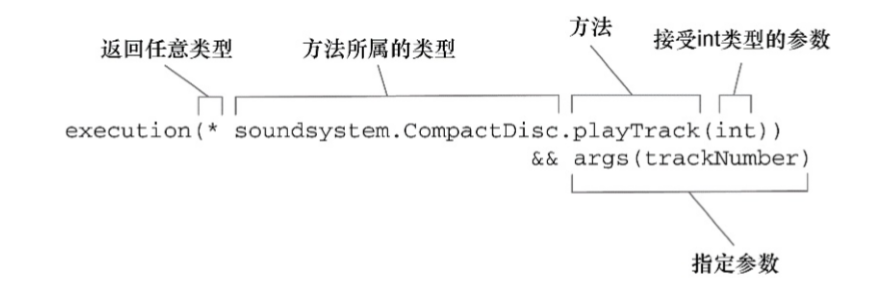
现在我们可以在Spring配置中将BlankDisc和TrackCounter定义为bean,并启用AspectJ自动代理:

1
2
3
4
5
6
7
8
9
10
11
12
13
14
15
16
17
18
19
20
21
22
23
24
25
26
27
28
29
30
31
32
33
34
35
36
/ 配置TrackCount记录每个磁道播放的次数
package soundsystem;
import java.util.ArrayList;
import java.List;
import org.springframework.context.annotation.Bean;
import org.springframework.context.annotation.Configuration;
import org.springframework.context.annotation.EnableAspectJAutoProxy;

@Configuration
@EnableAspectJAutoProxy // 启用AspectJ自动代理
public class TrackCounterConfig
{
@Bean
public CompactDisc sgtPeppers() // CompactDisc bean
{
BlankDisc cd = new BlankDisc();
cd.setTitle("Sgt. Pepper's Lonely Hearts Club Band");
cd.setArtist("The Beales");
List<String> tracks = new ArrayList<String>();
tracks.add("Sgt. Pepper's Lonely Hearts Club Band");
tracks.add("With a Little Help from My Friends");
tracks.add("Lucy in the Sky with Diamonds");
tracks.add("Getting Better");
tracks.add("Fixing a Hole");

// ...other tracks omitted for brevity...
cd.setTracks(tracks);
return cd;
}

@Bean
public TrackCounter trackCounter() // TrackCounter bean
{
return new TrackCounter();
}
}

通过注解引入新功能

静态语言的Java并不能像动态语言那样有开放类的理念,但是我们依旧可以使用切面为Spring bean添加新方法。在Spring中,切面只是实现了它们所包装bean相同接口的代理,如果除了实现这些接口,代理也能暴露新接口的话,会怎样呢?我们想办法使用AOP为示例中的所有Performance实现引入下面的Encoreable接口:
1
2
3
4
5
package concert;
public interface Encoreable
{
void performEncore();
}

为此我们需要创建一个新的切面:

1
2
3
4
5
6
7
8
9
10
11
package concert;

import org.aspectj.lang.annotation.Aspect;
import org.aspectj.lang.annotation.DeclareParents;

@Aspect
public class EncoreableIntroducer
{
@DeclareParents(value = "concert.Performance+", defaultImpl = DefaultEncoreable.class)
public static Encoreable encoreable;
}

可以看到EncoreableIntroducer是一个切面,但是他与我们之前的切面有所不同,使用了@DeclareParents注解,该注解由三部分组成:

  • value该属性制定了哪种类型的bean要引入该接口,在本例中即Performance类型。标记后面的加号表示是Performance的所有子类型,而不是Performance本身。
  • defaultImpl:该属性指定了为引入功能提供实现的类。
  • @DeclarationParents:该注解所标注的静态属性指明了要引入了接口。

和其他切面一样,我们需要在Spring应用中将EncoreableIntroducer声明为一个bean:

1
<bean class = "concert.EncoreableIntroducer" />

在XML中声明切面

除了使用注解的方式,还可以考虑使用XML文件配置的方式。在Spring的aop命名空间中,提供了多个元素用来在XML中声明切面,如下表:在使用XML文件配置方式之前,先把之前在Audience类中的注解全部移除掉。
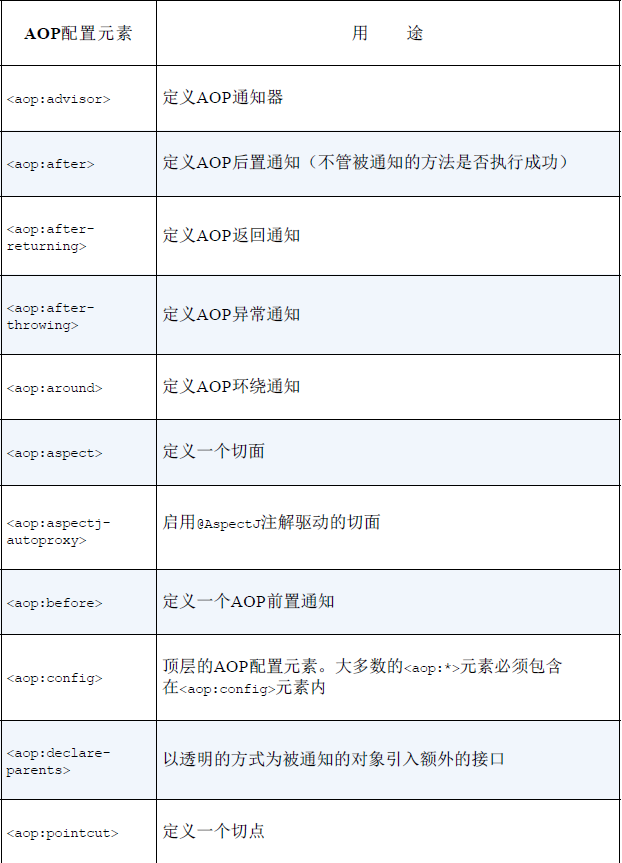
声明前置和后置通知

接着我们在XML文件中配置将没有注解的Audience类转换为切面:

1
2
3
4
5
6
7
8
9
10
 <aop:config>
<aop:aspect ref="audience">

<aop:pointcut expression="execution(* XMLconcert.Performance.perform(..))" id="performance"/>
<aop:before pointcut-ref="performance" method="silenceCellPhones"/>
<aop:before pointcut-ref="performance" method="takeSeats"/>
<aop:after-returning pointcut-ref="performance" method="applause"/>
<aop:after-throwing pointcut-ref="performance" method="demandRefund"/>
</aop:aspect>
</aop:config>

声明环绕通知

将之前的watchPerformance()方法及其类中的注解都移除:

1
2
3
4
5
6
7
8
9
10
11
12
13
14
15
16
package concert;
import org.aspectj.lang.ProceedingJoinPoint;

public class Audience {

public void watchPerformance(ProceedingJoinPoint jp) {
try {
System.out.println("手机静音");
System.out.println("得到座位");
jp.proceed();
System.out.println("鼓掌!!!");
} catch (Throwable e) {
System.out.println("这演的啥啊!退票");
}
}
}

然后在XML文件中配置:

1
2
3
4
5
6
7
<aop:config>
<aop:aspect ref="audience">
<aop:pointcut id="performance" expression="execution(* concert.Performance.perform(..))"/>

<aop:round pointcut-ref="preformance" method="watchPerformance"/>
</aop:aspect>
</aop:config>

为通知传递参数

将TrackCounter类中的注解都移除掉,然后在XML文件中配置如下:

1
2
3
4
5
6
7
<aop:config>
<aop:aspect ref="trackCounter">
<aop:pointcut id="trackPlayed" expression=" execution(* com.springinaction.disc.CompactDisc.playTrack(int)) and args(trackNumber)" />

<aop:before pointcut-ref="trackPlayed" method="countTrack"/>
</aop:aspect>
</aop:config>

通过切面引入新的功能

依旧将原Encoreable的注解移除掉,然后配置为:

1
2
3
4
5
<aop:aspect>
<aop:declare-parents types-matching="com.springinaction.perf.Performance+"
implement-interface="com.springinaction.perf.Encoreable"
default-impl="com.springinaction.perf.DefaultEncoreable" />
</aop:aspect>

我们还可以使用delegate-ref属性来标识:

1
2
3
4
5
<aop:aspect>
<aop:declare-parents types-matching="com.springinaction.perf.Performance+"
implement-interface="com.springinaction.perf.Encoreable"
delegate-ref="defaultEncoreable" />
</aop:aspect>

delegate-ref属性引入了一个Spring的bean作为引入的委托:

1
<bean id="defaultEncoreable" class="com.springinaction.perf.DefaultEncoreable" />